Gulf Payment Methods for Trainers: KNET, mada, Apple Pay
· 10 min read · Webinly team
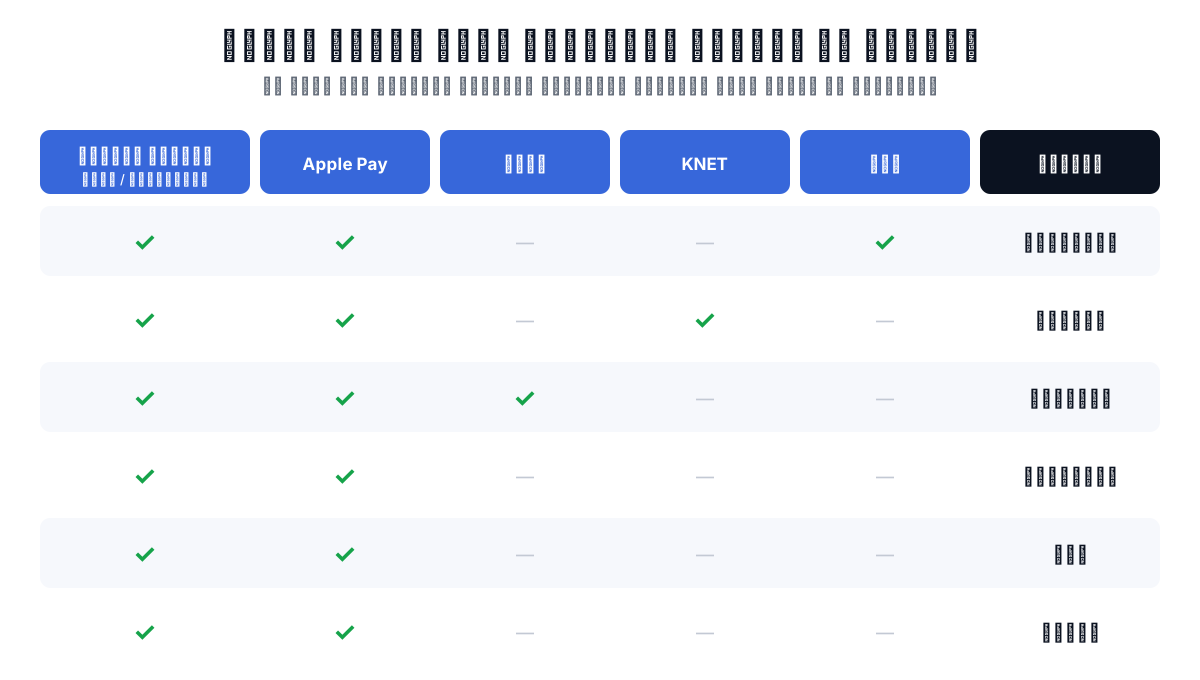
You post the ad for your course. A follower in Riyadh or Kuwait gets excited, taps the payment link... and lands on a page that takes neither mada nor KNET and asks for an international credit card he does not even own. He closes the page, messages you 'no problem, I'll send a bank transfer', then gets busy and forgets. This story repeats every day with trainers who deliver excellent content and lose a slice of their sales in the last meter: the moment of payment.
The problem is not your audience and not your price. The problem is that most tools for selling courses and webinars were built for the US and European market, where everyone pays by credit card. In the Gulf, every country has its own local method people actually trust: mada in Saudi Arabia, KNET in Kuwait, Benefit in Bahrain, and Apple Pay everywhere. Sell without these methods and you are asking your customer to adapt to you instead of the other way around.
In this guide: which online payment methods dominate the Gulf and why they matter to you as a trainer, how to choose the right payment gateway, and how to connect your own Tap account to Webinly in minutes so you collect the full price of your webinars and courses, in your local currency, with no platform commission.
Why you lose sales at the payment step
E-commerce has a well-known rule: every extra step between 'I want to buy' and 'I paid' drops a share of buyers. An unfamiliar payment method is not one extra step, it is three: doubt ('is this site safe?'), a practical blocker ('I do not have an international card'), and postponement ('I will pay later some other way'). And in sales, postponed almost always means forgotten.
The workarounds trainers fall back on cost more than they save. Manual bank transfers mean chasing every buyer one by one, confirming each amount by hand, sending the access link by hand, and losing the midnight sales that wait for no one. Generic payment links detached from your webinar platform mean payment and registration never connect: whoever pays is not registered automatically, and whoever registers, you cannot tell if they paid.
The right fix has two parts: local payment methods your audience trusts, and a direct link between payment and registration, so the attendee pays and receives their seat and access link in the same moment, with zero manual work from you.
The online payment methods that dominate the Gulf
Ask 'which payment methods can my audience actually use?' and the answer changes by country, which is exactly why this matters. International cards (Visa and Mastercard) exist everywhere but are not always the preferred method, Apple Pay is spreading fast across the whole Gulf, and the local methods lead in their home markets:
- mada (Saudi Arabia): the national payment network wired straight to bank accounts. A wide slice of Saudis pay with mada and never use credit cards at all.
- KNET (Kuwait): practically the only method Kuwaiti buyers trust for paying online, even for large amounts.
- Benefit (Bahrain): the Bahraini equivalent, with the same direct-to-bank-account logic.
- Apple Pay: common across Saudi Arabia, the UAE, Kuwait, Qatar, Bahrain, and Oman. It shrinks checkout to a fingerprint or a glance, especially on mobile, where most browsing happens anyway.
- International cards (Visa / Mastercard): the shared baseline in every country, plus your customers outside the Gulf who buy your courses in dollars or euros.
What is a payment gateway, and how do you pick the right one?
A payment gateway is the middleman that securely collects the buyer's payment details, verifies them with the bank, then moves the money to your account. It decides which methods your audience can pay with, in which currency, how much commission each transaction costs, and when the money actually reaches you.
When comparing the best payment gateways for a training business, these four criteria settle the decision:
- Local methods: does it support mada, KNET, Benefit, and Apple Pay? A famous global gateway without mada effectively means giving up part of the Saudi market.
- Currencies: does your audience pay in riyals, dinars, and dirhams, or are they forced into dollars at a murky exchange rate? Paying in local currency raises trust and cuts bank declines.
- Availability in your country: some global gateways do not even open accounts for residents of every Gulf country, while gateways like Tap were built specifically for this market: they support companies and individuals in Saudi Arabia, Kuwait, Bahrain, the UAE, Qatar, and Oman.
- Integration with your tools: a great gateway detached from your webinar platform sends you right back to manually matching payments to registrations. The best gateway is one that plugs straight into the platform you sell on.
Tap: the payment gateway built for the Gulf
Tap Payments (tap.company) is a Gulf payment gateway founded in Kuwait, serving thousands of businesses in the region. Its strength is exactly what a Gulf trainer needs: native support for mada, KNET, Benefit, and Apple Pay alongside international cards, and acceptance of all the Gulf currencies (Saudi riyal, Kuwaiti dinar, Bahraini dinar, dirham, Qatari riyal, Omani riyal) plus the dollar, euro, and British pound.
Accounts are open to companies and to individuals in the six Gulf countries, and signup happens directly on Tap's site. Your dashboard holds the API keys, which are all you need to connect a webinar platform, while payouts to your bank account activate once Tap completes verification of your details.
One point that shapes your audience's experience: local methods are tied to their currencies. mada works with prices in Saudi riyals, KNET with Kuwaiti dinars, Benefit with Bahraini dinars, while Apple Pay and cards work with supported currencies generally. So price your webinar in your core audience's currency: targeting Saudi Arabia? Price in riyals so mada shows up. Targeting Kuwait? Price in dinars so KNET shows up.
And the part that matters most for your budget: when you connect your own Tap account to Webinly, the money relationship is directly between you and Tap. The processing fee you agree with Tap is the only deduction. Webinly takes no cut of your Tap sales. The money settles in your account, not in a middleman's.
How to connect Tap to your webinar platform and start selling
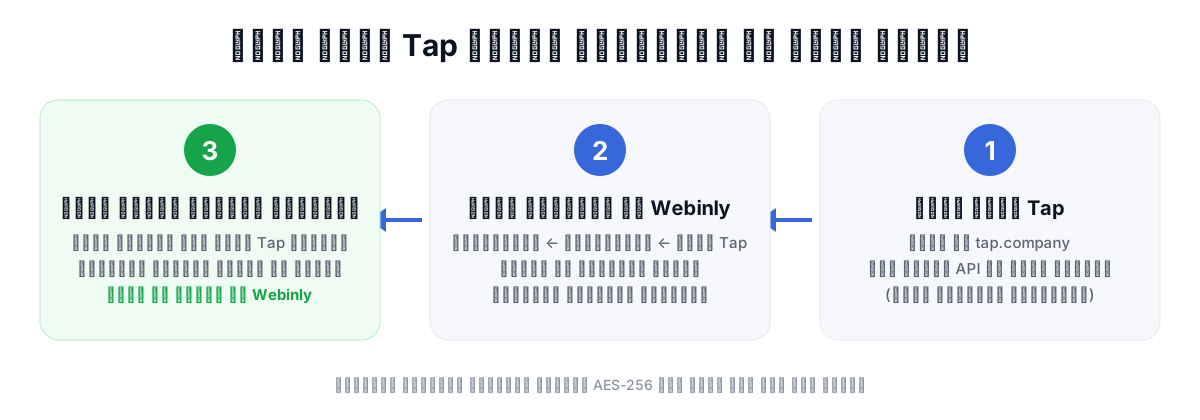
The connection in Webinly is designed to be the easiest step of your journey: no developer, no technical knowledge, just copy and paste one key.
From the Webinly dashboard: Settings, then Payments, and in the Tap Payments section paste your secret API key and hit 'Connect Tap'. The platform verifies the key instantly against Tap's servers: if it is valid it is stored encrypted with AES-256 and never shown to anyone again (not even you), and if it is wrong you get a clear message explaining why.
Once connected, open any webinar, turn on 'Paid registration', and set your price in your currency. Done: your registration page now sells. If you start with a test key (sk_test), the platform clearly warns you that payments will be test-only until you swap in the live key.
What does checkout look like to the attendee?
The attendee enters their name and email on your webinar page as usual, then is sent automatically to a secure payment page hosted by Tap itself, on the same rails that carry payments for thousands of Gulf stores. There they pick their method from what your webinar's currency allows and what is active on your Tap account: mada for prices in Saudi riyals, KNET for Kuwaiti dinars, Benefit for Bahraini dinars, and Apple Pay and cards for the rest.
The moment payment succeeds they return automatically to the confirmation page, receive their seat and a confirmation email with the access link, and enter the same automatic reminder sequences that run for free registrations. No manual step from you anywhere.
What if the attendee closes the browser right after paying, or the connection drops before they reach the confirmation page? Those cases are covered: the platform periodically re-checks the status of every payment with Tap's servers, so whoever paid gets their seat and confirmation email automatically even if they never completed the redirect. There is no 'paid but never received' case lost in the void.
Worth knowing: Stripe is also available in Webinly as the default payment option, so if your business sits outside Tap's coverage or your audience is global you can sell through it, and you switch between the two gateways from the same settings.
A payment method alone does not sell: complete the equation
Smooth payment is necessary but not sufficient. What fills the checkout page in the first place is a well-built webinar: a clear offer, real value, and an honest reason to buy now. If you have not built that part yet, start with the step by step guide to selling with webinars on our blog: webinly.com/blog/how-to-sell-with-webinars
And because a big share of sales comes from people who missed the original broadcast, turn on the automatic reminders and follow-up (1 day before, 3 hours before, 30 minutes before, plus the replay emails). They are built into the platform and work for paid and free webinars alike. If you are torn between live and automated, the full comparison is here: webinly.com/blog/live-vs-automated-vs-evergreen
The end state worth working toward: your Saudi webinar priced in riyals so your Jeddah audience pays with mada, its Kuwaiti version in dinars so your Kuwait audience pays with KNET, and Apple Pay and cards covering everyone everywhere. Every buyer receives their seat instantly while you sleep, and the money settles in your own Tap account, not with a middleman skimming a cut on top of processing fees. That is the difference between 'I sell courses' and 'I have a system that sells my courses'.
Frequently asked
Which online payment methods dominate the Gulf?
International cards (Visa and Mastercard) and Apple Pay are available across all Gulf countries, and the local methods lead in their home markets: mada in Saudi Arabia, KNET in Kuwait, and Benefit in Bahrain. Each local method is tied to its currency, so a trainer covers it by pricing the offer in the core audience's currency, with Apple Pay and cards as the common denominator for everyone.
How does checkout work for a paid webinar on Webinly?
The attendee registers on the webinar page, is sent to a secure payment page hosted by the Tap gateway, pays with their preferred method, then returns automatically to the confirmation page and receives a confirmation email with the access link. The whole flow is automatic, with no manual step from the trainer.
How do I turn on payments for my webinars?
Create an account with Tap (tap.company) and take an API key from their dashboard, then in Webinly: Settings, Payments, paste the key and hit Connect Tap. After that, enable 'Paid registration' on your webinar and set the price in your currency. You can start with a test key to experiment before going live.
How much does Webinly take from my Tap sales?
Zero. Payments run through your own Tap account directly, so the full amount reaches you and Webinly deducts no commission on Tap sales. The only deduction is the payment processing fee you agree with Tap itself, as with any gateway.
Why do online payments sometimes fail?
The most common reasons: insufficient balance, a card that is expired or not enabled for online purchases, cancelling during the bank verification step, or the connection dropping mid-payment. The platform only grants the seat and sends the access link after confirming with the gateway that the payment succeeded, so a failed attempt leaves no trace and the attendee can simply try again.
Do I need a commercial registration to open a Tap account?
Tap opens accounts for companies and for individuals across the Gulf (Saudi Arabia, Kuwait, Bahrain, the UAE, Qatar, Oman). Required documents vary by country and account type: an ID and bank account for individuals, plus the commercial registration for companies. Tap's team confirms the exact list during signup, and you receive payouts once your account verification is complete.
Connect your own Tap account and turn your webinars and courses into a sales system that runs on the payment methods your Gulf audience already trusts, with the full amount landing in your account.
Create your account